
How To Approve Keychain Packaging For Bulk Orders
Your store needs a packed keychain it can hang, scan and count. A backing card that fits the logo body can leave the ring swinging.
Test the complete unit in the pack. Then open a sample carton and check the count and product codes.
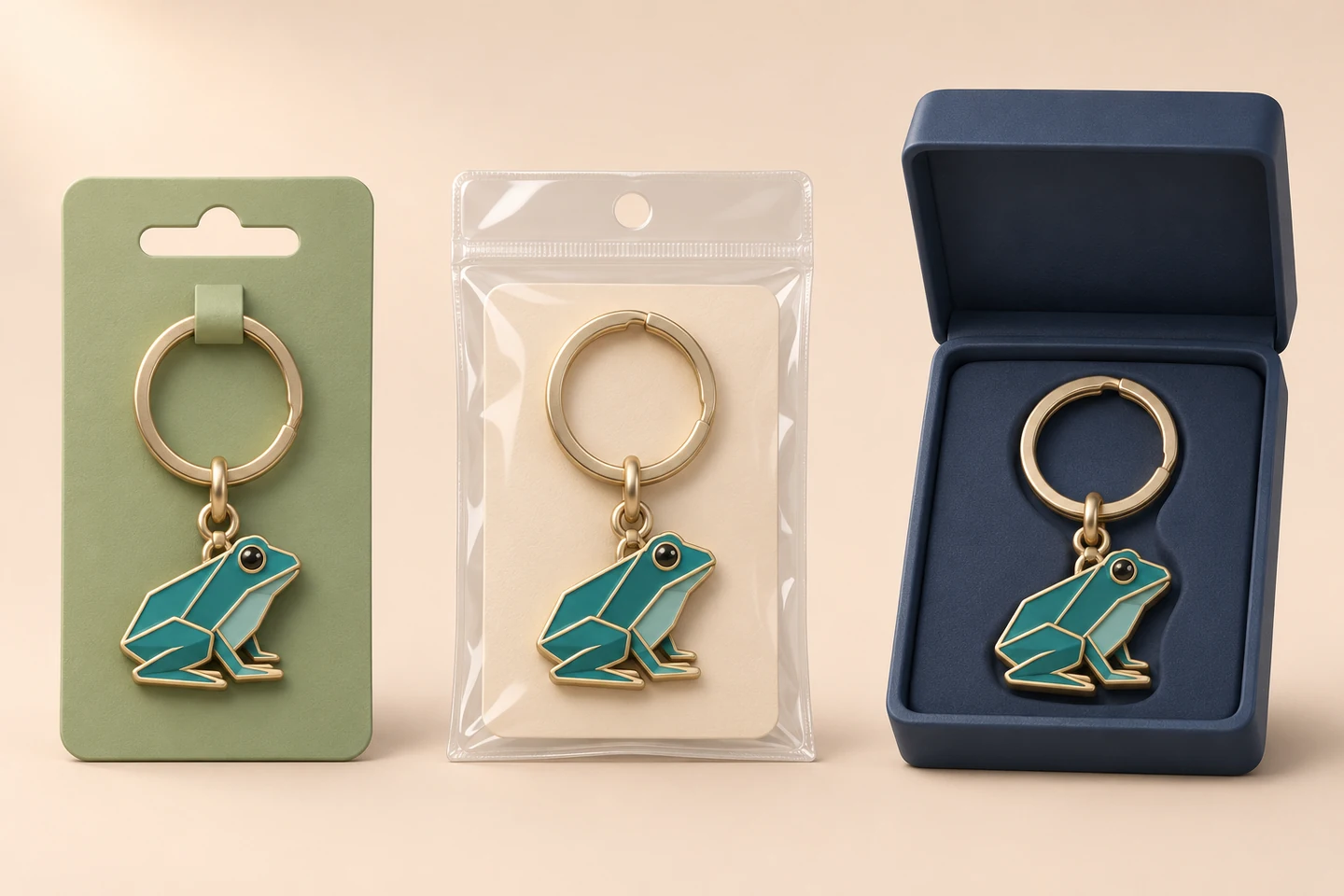
Choose The Format Around The Sales Channel
Ask where staff will put the product after receiving it. A peg display, an online order, and a gift set require different handling.
A display card can show the face and branding on a peg. Check how the ring and tag hang from the card.
A pouch can keep the unit together during picking or dispatch. Check whether you need an insert to control movement inside the pouch.
A small carton can protect an item that needs a covered presentation. Ask how the keychain stays in position when someone opens it.
| Format | What To Check On A Sample |
|---|---|
| Hanging card | Hang it on the retailer’s actual peg and watch where the ring and charm settle. |
| Protective pouch | Move a packed item through picking and packing with other items in the order. |
| Carton or tray | Close it with the actual ring and check what the customer sees on opening. |
| Loose components | List which pieces ship separately and who completes the pack. |
Record the primary format before you compare supplier quotes. If you need a second format, assign a distinct packaging code and count.
Measure The Body And Hardware Together
Lay out the actual assembled keychain with its ring, links, and any movable pieces. Measure the range it occupies as those pieces move.
Check what sits highest when the keychain lies flat. A ring or hinged clip may set the pouch depth even on a thin body.
If your keychain is long or off centre, hang it from a sample card. Check where the end sits and which face shows.
- Mark overall hanging height from the top of the ring to the lowest point.
- Mark the widest position of the body, ring and any joint.
- Identify the thickest point, including any overlap between metal components.
- Show how parts swing and identify places where finishes can touch.
- Check the largest or heaviest version before approving a shared package.
A metal carabiner keychain may sit differently from a tag on a split ring. Show both assemblies if they share one pack format.
Review removable pieces separately. On a trolley coin keyring, ask how the pack will retain the coin if it comes loose.
Approve The Hanger And Ring Retention
Get the retailer’s hanger drawing or a sample peg before approving the slot. Check that the card has space above the hanging load.
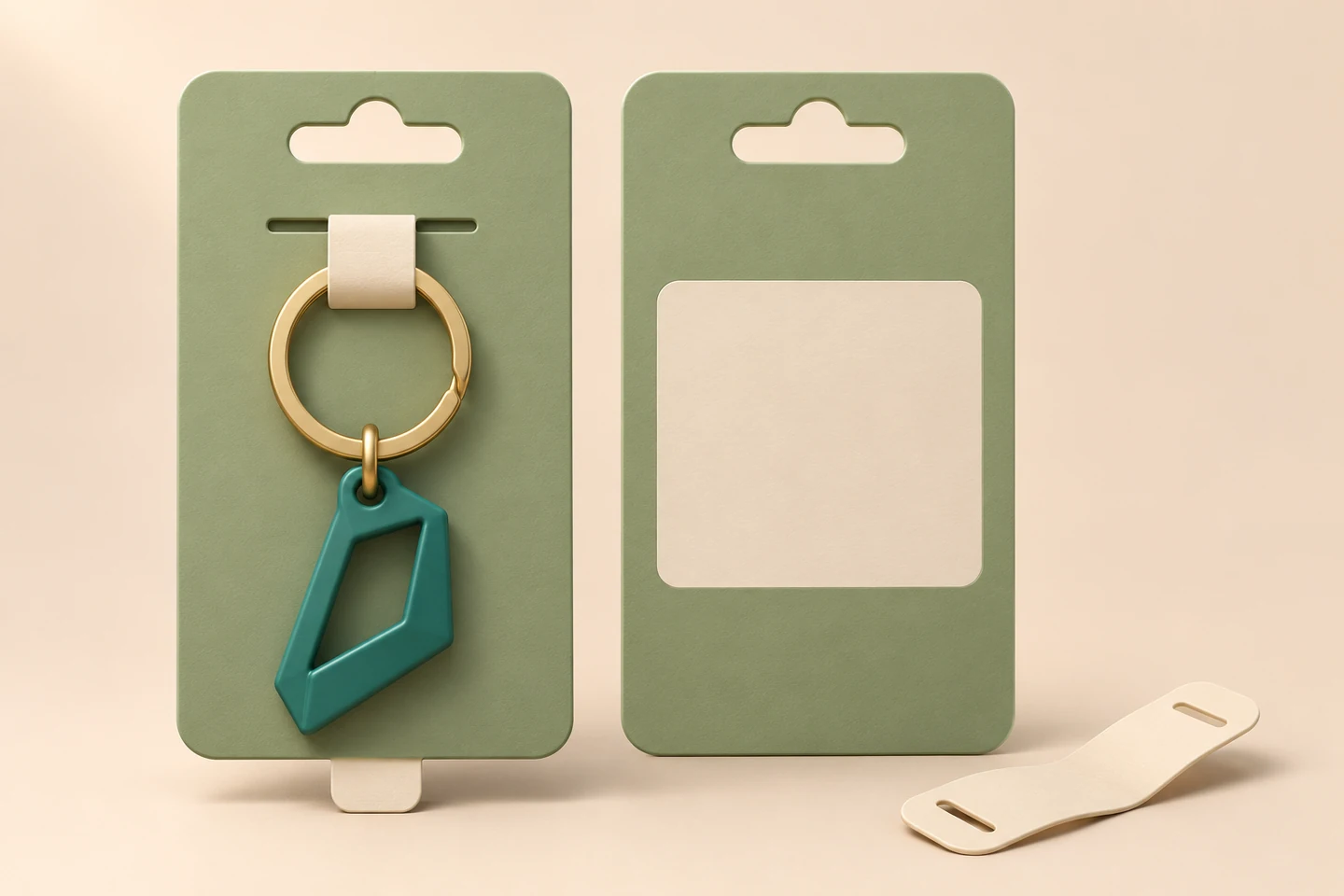
Show how the ring or clip is attached to the card. Ask the packer to demonstrate fitting and removing the approved restraint.
For a strap, show both points where it passes through the card. Leave room for the ring to settle below the hanger.
Hang the completed pack with other packs on the peg. Watch whether neighbouring pieces rub or stop customers from lifting one unit easily.
If the card leans or twists, check where the weight sits. Ask for a revised attachment position and repeat the check.
Protect The Print And Scan Zones
Reserve the barcode area on the artwork before you place the ring. Check that hardware, seams and stickers stay outside the scan area.
Ask the retailer for their print and barcode requirements. Scan a finished pack in the orientation staff will handle during receiving.
Keep the retail barcode and any stock code readable at the same time. Mark which face staff should see on the proof.
Protect The Finish During Handling
Identify which surfaces must arrive free of visible scuffs. Look for the ring, connector, or nearby pack that can touch those surfaces.
Ask how the packaging will control movement if the item turns or lies flat. Compare a restrained unit with one packed loose.
If you add a divider, check how it stays in place. Run through normal handling steps with the completed pack and inspect the faces.
Give the packer an approved appearance sample or clear reference photos. Ask them to record which finish checks apply to each version.
If you choose clear packaging, look through it under store lighting. Check whether folds or reflections obscure important details on the keychain.
If the product is meant to be touched on display, ask how the card will hold it. Check retention after the expected handling.
For an assembled logo item, compare your pack with a complete logo keychain. Include the actual connector when testing the pack.
Match The Packaging SKU To The Carton
Keep the product code and pack code in the same order row. Record the code scanned by your retailer or fulfilment team.
If the same keychain ships in two formats, give each finished pack its own reference. Use that reference on the pack and carton records.
| Example Pack Code | Unit And Receiving Count |
|---|---|
| TEAL-HANG | One teal keychain on a display card, 24 finished retail packs in each inner. |
| TEAL-POUCH | One teal keychain in a pouch, 50 finished packs in each inner. |
| TEAL-SPARES | Loose reserve hardware for assembly, recorded separately from sellable units. |
Use the example format to separate the two packaging choices in your order. Confirm pack quantities and carton counts for your actual shipment.
Show where labels belong when the carton is stacked. Ask receiving staff what they can read before turning or opening the carton.
Open a representative carton and compare the contents with the packing list. Verify the card orientation and the count of each code.
Check The Packing Work Before You Order
Ask the packing team to assemble several units using the proposed card and restraint. Watch where operators hold the keychain during fitting.
Show where the approved restraint closes and what it should look like afterward. Include a photo showing a correctly fitted card from behind.
Count how many loose packaging parts the operator needs for one saleable unit. Record which supplier provides each part and the quantities required.
Check whether a shared card can carry both left-facing and right-facing designs. Confirm each design still hangs the way the retailer expects.
If fulfilment staff remove display cards before mailing an order, review that step with them. Keep the item code with the unpacked piece.
Ask the packer to sort an example batch with two similar colourways. Check whether artwork cues and stock labels make the variants easy to distinguish.
Keep the barcode away from areas the operator presses or folds while packing. Read it again after a completed pack comes off the line.
Ask your retailer how rejected packs are set aside at receiving. Agree who supplies spare cards and how repacked units will be identified.
If the carton will go straight to a store, test how staff remove the first row. Check that cards lift without pulling neighbouring units.
Agree how staff will handle odd counts in the last carton. Put the actual count and the relevant pack code on the receiving record.
Sign Off A Shelf And Carton Sample
Use production intent materials for your finished pack sample. Record any substitute material and agree when you will review the final version.

- Confirm the assembled body, ring, and connector against the order reference.
- Hang and remove the card on the intended retail peg.
- Check ring retention and inspect the metal faces after normal handling.
- Scan the retail code and confirm it identifies the correct pack.
- Open the carton and count each pack code against the approved schedule.
- Record the card artwork, restraint, carton and sample revisions together.
If you change a ring, card slot, or package material, mark what the change affects. Repeat the fit or scan check for that item.
Agree which finished unit becomes the reference for packing staff. Give them photos of both faces and the approved carton arrangement.
Review sample packing and production packing as separate quote lines. Confirm who supplies cards, printed labels, and carton materials for the run.
If several factories handle the order, send the same proof to each one. Name who checks the first packed cartons before dispatch.
Keep a spare approved sample for receiving questions. Share the pack code and proof revision whenever you request a repeat order.
Frequently Asked Questions
Can The Same Card Carry Two Keychains?
Make a sample with both attached and check how it hangs. Ask the retailer to confirm display space and the finished pack code.
Can We Use A Card That The Retailer Supplies?
Request the actual card stock and print proof. Have your packer confirm the restraint fits and who supplies replacements for damaged cards.
What If The Retailer Changes Pegs After Approval?
Ask for the new peg dimensions or a sample. Check hanging clearance and lifting access before ordering more cards.
Should The Card State The Metal Finish?
Check what your retailer needs on the pack. Use the same approved finish name on the card artwork, product record and order.
How Should We Handle An Unscannable Label At Receiving?
Set the pack aside and check its code against the order. Ask who may relabel it and how staff will record the change.
Can We Test A Card Without A Printed Proof?
A plain mockup can show fit and balance. Review a printed sample when you need to approve scan performance or artwork placement.
Final Thoughts
Bring an assembled keychain and your retail packing requirements. Explore custom keychain options or send your packing brief to discuss a finished sample.